A Mac can now take a video job on MetalCloud. You write the shot — or you hand it a still — and a host running Lightricks’ LTX-2.5 renders an MP4 on the machine in front of them. The file comes back through the same job API we already use for inference.
This is not a second cloud bolted on the side. It is the marketplace doing what it already does: find a Mac that has the pack, the memory, and the hours, then bill the time the work actually took.
In short
Customers submit type: "video". Hosts with 96 GB or more install the q8 pack and switch video hosting on. Clips go to 20 seconds at 720p and 10 seconds at 1080p. The Community License applies. The clip is machine-generated, and the model’s watermark stays on the file.
What LTX-2.5 actually is
LTX-2.5 is a 22-billion-parameter open-weight video model from Lightricks. The pack we serve is the MLX q8 build, about 68 GB on disk, which is the pack the current video runtime can load. It takes a text prompt. It can also take a still as the first frame. It writes H.264 at 24 frames a second.
The model has a twenty-second ceiling. At 720p that full length fits the pixel budget we ship. At 1080p the same budget holds a ten-second take. Those are the numbers the API will accept. They are not a promise about how a particular shot will look, and they are not a queue-time guarantee.
We run the two-stage generate path by default: a first pass to lock motion, then a refine. That is slower than a distilled one-shot, and it is the quality we want on the wire. If you only have a subject and no camera language, the runtime adds cinematic direction so the model is not left guessing “a person standing there.”
Why this lives on Apple silicon
Video weights of this size want a single memory pool. A 96 GB unified-memory Mac can hold the q8 pack and still have room for the working set. The renderer talks to Metal. Nothing about that requires a data-centre GPU, and nothing about it requires the host to open a public port. The MetalCloud app keeps the runtime on 127.0.0.1 and uploads the finished file through the daemon the way it already uploads inference output.
That last point matters to hosts. Video hosting is an opt-in on the machine card. Inference hosts without the memory, or without the disk, never see a video job. Personal files stay off the path. The sandbox is the same idea as every other job: the work runs in the app’s space, then the MP4 leaves, and that is all.
What a customer sends
The create body is the job envelope you already know, with type set to video and model_id set to ltx-2.5-mlx-q8. Inside input:
prompt— required, 2,000 characters or fewerseconds— 1 to 20widthandheight— 256 to 1920, multiples of 32 (we snap to the 64-pixel grid the model wants)fps— 24 unless you have a reasonseed— optional, for a repeatable takeimage_urlorimage_b64— optional still for image-to-video
Give the job enough max_duration_minutes. A short 720p clip is usually a few minutes of GPU time on an M3 Ultra. A longer clip, or 1080p, takes more. The default limit is fifteen minutes; raise it when you ask for the long end of the range. You are billed at the host’s hourly rate for the time the render runs, plus VAT as usual.
{
  "type": "video",
  "model_id": "ltx-2.5-mlx-q8",
  "input": {
    "prompt": "A grey heron lifts off a misty canal at dawn, slow tracking shot, golden light",
    "seconds": 8,
    "width": 1280,
    "height": 704,
    "fps": 24
  },
  "max_duration_minutes": 30
}
How to write a shot the model can hold
The difference between a clip that feels like a still with a wobble and a clip that feels directed is almost always the prompt, not the resolution. LTX-2.5 responds to what is in frame, what the light is doing, and what the camera does over time. Leave any one of those out and the model invents it, often as a locked-off phone video.
A useful prompt names four things, in about that order:
- Subject and action. “A grey heron lifts off” is better than “a bird.” The verb is the edit.
- Place and atmosphere. “Misty canal at dawn” gives the model weather, colour temperature, and a ground plane.
- Camera. “Slow cinematic tracking shot” or “overhead, static” or “handheld, close.” If you do not say, you get a default push that may fight the action.
- Light. “Golden light, gentle ripples” is cheaper than a paragraph of adjectives, and it keeps the grade consistent across frames.
Do not stack conflicting cameras. “Orbiting drone, extreme close-up, locked tripod” asks the model to be three people. Do not write a plot. Twenty seconds is a beat, not a scene. One action, one move, one change in the light.
For image-to-video, the still is the first frame. Use a picture that already has the composition you want. The prompt then describes what happens next, not a second painting. If the still is a latte being poured, write the pour and the steam, not “a beautiful café.” Conditioning strength, when you set it, is how hard the first frame holds; leave it unset unless you are iterating.
Portrait is a different picture
A 704×1280 take is not a 1280×704 take cropped. Write it for a phone: fewer objects in the sides, a taller gesture, a subject that can travel up the frame. “Vertical phone video, handheld” is honest and the model treats it as such. The heron again, this time standing up:
What a host installs
Video hosting is a checklist, not a vibe. The Mac needs:
- Apple silicon and 96 GB of unified memory or more
- About 70 GB free for
MrMofer/ltx-2.5-mlx-q8 - macOS 15 or later, and MetalCloud 2.1 or later
- A host account that already passes ordinary jobs
In the app, download the pack from Models. The first time you switch Video hosting (LTX-2.5) on, the app installs rapid-mlx into its own Python environment and starts the local server. The machine card turns green when memory, opt-in, pack, app version, and runtime are all true. Until then the marketplace will not send a video job to that Mac.
You are paid the same way as inference: hourly rate, time the job ran, paid on the 1st, bank or PayPal, £50 minimum. There is no separate video tariff. A render that takes twelve minutes is twelve minutes of that rate.
The step-by-step, including the licence tick, is in the video hosting guide.
Licence, disclosure, watermark
LTX-2.5 ships under the LTX-2.x Community License. It is free to use commercially if the organisation is under US$10 million in annual revenue. Above that line you need a commercial licence from Lightricks. Switching video hosting on is the host confirming they have read that text and are eligible. Customers who publish the files should read it too.
Every output is machine-generated. The job record says so. The model’s content watermark is left on the file; do not strip it. If you put a real person in the still or the prompt, you need their documented consent before the clip leaves your account — that is our likeness rule, not Lightricks’.
What this is not
It is not a reserved-capacity promise. One host with the pack on disk is not a farm. If no video host is online, the create call returns the same “no matching host” you already know from inference.
It is not a score against other video models. We are not publishing Elo, side-by-sides, or “as good as” copy. Watch the clips on the video page and decide if the look is useful for the work you have.
It is not an energy claim, and it is not an SLA. Renders take the time they take. Raise max_duration_minutes when you ask for the long or the large.
It is not an editing desk. A MetalCloud job returns an MP4.
| Customer | Host | |
|---|---|---|
| Starts with | An account and a prompt | 96 GB Mac, app 2.1, pack on disk |
| Sends | type: "video" job | MP4 upload when the runtime finishes |
| Pays / earns | Host hourly rate × render time | Same rate, paid on the 1st |
| Licence | Community License on the files you keep | Confirm eligibility when you opt in |
Where to go next
The product page is metalcloud.space/video. The operator guide is docs/video-hosting. The job envelope is on the REST API page. If you already host and the Mac has the memory, the switch is on the machine card.
If you are commissioning a first batch, start at 720p, write one action, and watch the MP4 before you spend an afternoon on 1080p. The model is happier when you are specific. So are we.
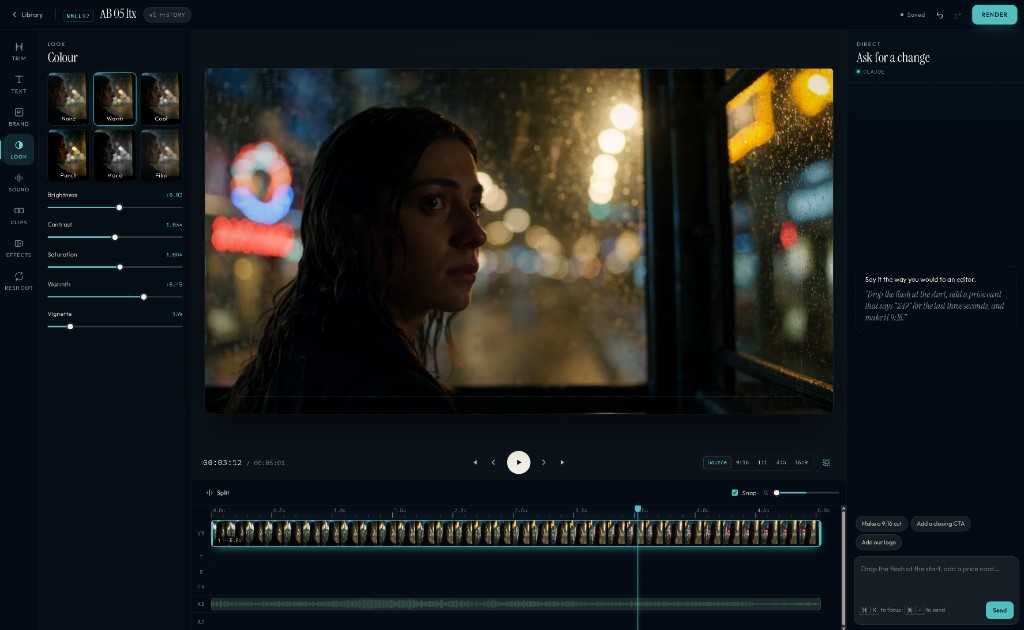
The editing suite
The full edit is in Studio.
MetalCloud renders the MP4. Colour, the cut, type, sound, and the next direction are the editing suite at Interlink Digital Studio.
Open the suite studio.interlink.digital- Colour
- Trim
- Type
- Sound
- Clips
- Direct
Quick Vid is the way in. Forty seconds a month, about five eight-second clips, from £39 + VAT.
See the clips, then run one.
The video page has the landscape and portrait takes. Accounts can submit type: "video" today.